Security and data handling

Understand how eva handles your data.

The specifics your team needs before rollout: where files live, what reaches a model, what is kept, and what is logged.

01

Where do original files reside?

In your systems, on your network. eva reads from your file servers and connected systems; originals are never moved or copied out.

02

Where does indexing happen?

On your infrastructure, on-premise or in a cloud environment you control. The setup is agreed per deployment and validated with your team during onboarding.

03

What is sent for model processing?

Only the context a request needs: retrieved passages and extracts, not whole files and not the index. Documents and the index stay on your network.

04

Which providers process it?

Model calls run through one governed gateway under your control, with a single central key. The provider behind the gateway is part of the deployment configuration agreed with you.

05

What is retained, and for how long?

Retention is yours to set, with purging per user or per project. We do not publish a fixed retention period; it is agreed at deployment.

06

Is customer content used for model training?

No. Nothing eva processes is retained for model improvement.

07

How are user permissions enforced?

eva mirrors the permissions your systems already apply and enforces them in code. If a user cannot open a document, eva cannot read it either.

08

Which actions require approval?

Anything that writes back to a system of record. eva does not write silently: write actions are opt in, approved by a person, and logged.

09

What is logged, and who can access the logs?

Every model call is audited, and every answer records the sources behind it. Logs sit in the central admin console for your team and can be exported.

10

Where is eva hosted?

On-premise or cloud based, depending on what your firm chooses. The hosting setup is validated with your team during onboarding.

Privacy blur is a display feature

One toggle hides figures and client names on screen. It is separate from access control, encryption and retention: permissions, encryption in transit and your retention rules apply whether the blur is on or off.

Controls your team runs.

01
One governed gateway
Every model call, one central key. Revoke once.
02
Central connector rollout
Enabled once, live on every laptop.
03
Runtime version control
Updates ship only after conformance tests pass.
04
Full activity log
Who asked what, and which sources answered.
05
Per team enablement
Pilot one function before you widen it.
06
Spend visibility
Usage and limits set centrally.

At a glance

How your data is handled.

Where it lives, how it is used, and what your team controls.

Where it lives

Originals
In your systems, never moved or copied out
Index location
On-prem or cloud, validated at onboarding

How it is used

Training on your data
Never
Permissions
Mirrored from your systems
Model traffic
Your governed gateway

What you control

Writes to systems of record
Opt in, logged
Activity log
Exportable

An operating layer the whole company runs on.

Built for enterprise

One layer, not ten tools
Every system read once, every project role served.
Domain agents
Preconstruction, design, delivery, commercial, finance, legal.
Permission aware
People see what they are already entitled to see.
On your infrastructure
eva runs next to the systems it reads.
Evaluated workflow by workflow
Compare the current process with the estimated saving before rollout.
Start with one workflow
Prove the output against your project information, then expand.
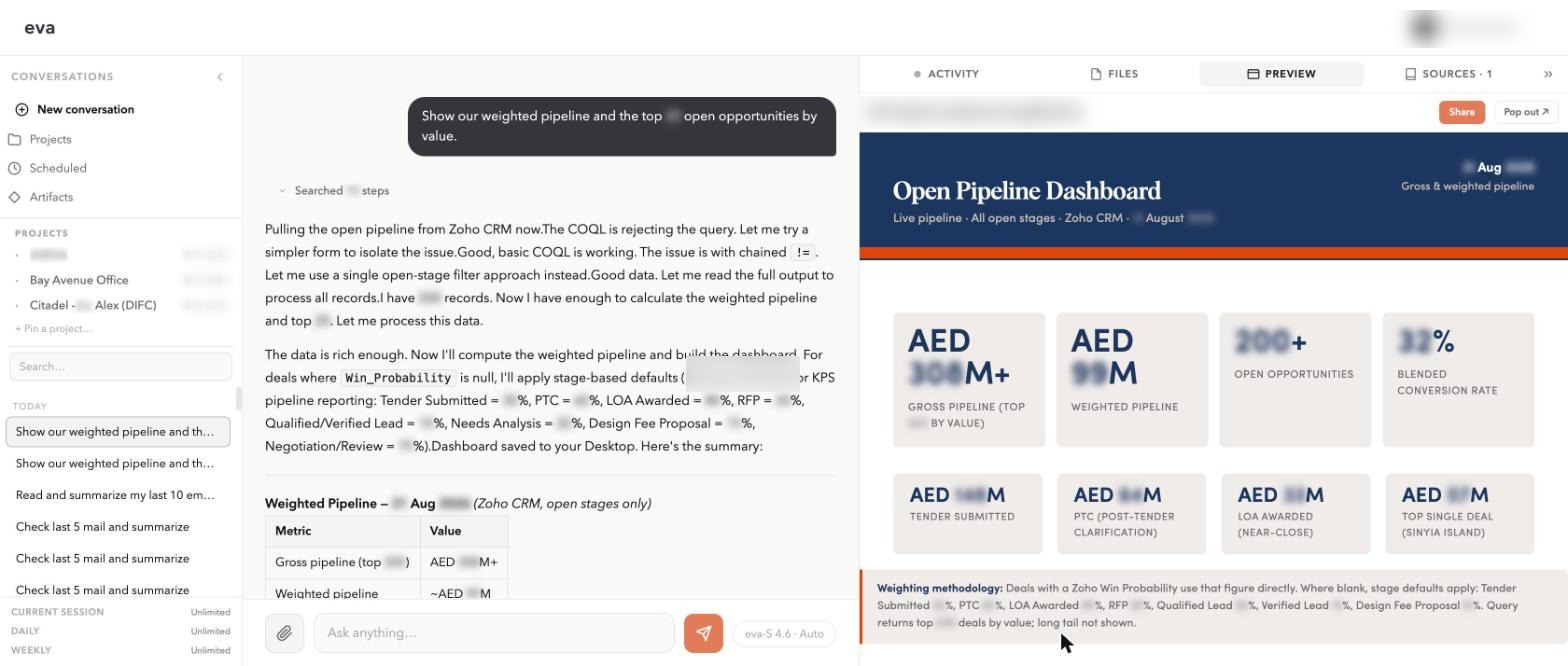
eva answering a weighted pipeline question and building a dashboard artifact alongside it
A leadership question answered across CRM and ERP, with the dashboard generated beside the answer.

Time is the product. Get yours back

See one workflow run against the systems and project information your team already uses.